
A searchable PDF is only the starting point. If the title, conclusion, decisive chart, methodology, and caveats live on different pages, a retrieval system still has to identify the right document and preserve enough cross-page context to use it well.
The practical response is not to abandon PDFs or turn every page into an article. Audit the document as a visual evidence package: make its purpose obvious early, keep figures legible, attach claims to context, and provide an HTML path for the buyer action the PDF supports.
Why can a searchable PDF still be hard to retrieve?
Indexability answers whether a system is allowed and technically able to process a file type. Retrieval answers whether that system can match a particular question to the right document or page. Those are different jobs.
Google Search Central lists PDF as an indexable document format. That documentation does not promise that every table, chart, footnote, or scanned page will surface for a buyer's question. It also does not establish citation in an AI answer, recommendation, traffic, or revenue.
A PDF can pass the file-type check and still create four practical problems:
- The cover names a campaign instead of the buyer problem.
- The contents page uses internal labels that do not match market language.
- A chart carries the conclusion while its denominator sits two pages later.
- The final recommendation depends on a caveat hidden in a footnote.
I reviewed the current Trovance inventory before choosing this angle. Existing resources cover JavaScript access, headings in long documents, source placement, and citation auditing. The missing job was a visual audit for complete multi-page documents rather than another generic claim that PDFs are either good or bad for AI search.
Run a quick diagnosis before editing. If the document has selectable text but weak page labels, improve navigation and context. If the decisive evidence is visually dense, create a legible figure and nearby explanation.
If the file is image-only, fix extraction and accessibility first. If the PDF supports a commercial decision, add an owned HTML page that satisfies the buyer's next step.
What did the document-retrieval study actually test?
The paper tested cross-document visual retrieval: given a query and a corpus, rank complete multi-page documents by relevance. It did not test marketing conversion or public AI-answer citations.
The authors introduced DocViRe with 10,884 training queries across 4,438 training documents and 2,237 test queries across 3,850 test documents. The document pools were disjoint, and the benchmark covered 7 English domains: biology, education, finance, government, industrial, legal, and research.
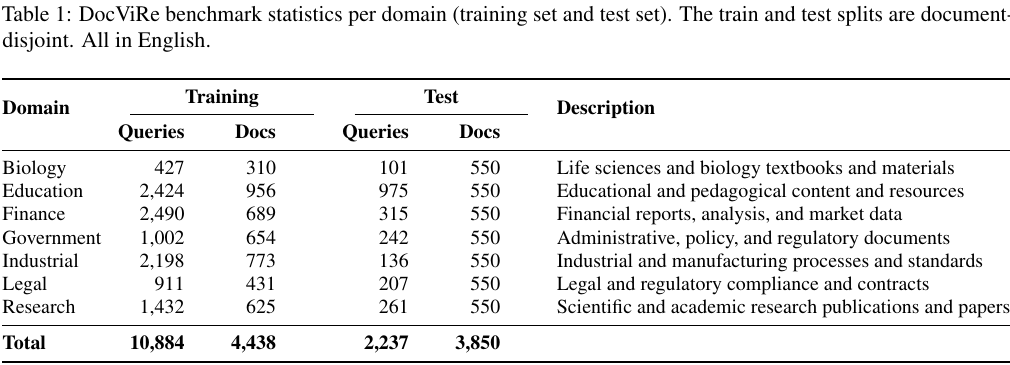
Source: DocPC paper by You, Zhou, and Du, Table 1.
The benchmark construction used OCR, an LLM-assisted grouping and query process, a second model pass, and final human review. Three annotators exhaustively reviewed the test split, and problematic query-document pairs were corrected and re-annotated.
The reported main comparison matters only inside that setup. DocPC-ColQwen First-4 reached average NDCG@5 of 44.09, while the strongest matched page-level baseline reported 38.91. The method also reduced indexed images from 38,746 to 3,850 and storage from 22.4 GB to 2.2 GB in the paper's test environment.
Those numbers are research results, not a playbook telling marketers to put everything in the first 4 pages. They show that complete-document representation and page selection deserve attention. They do not prove which public engine retrieves your PDF, which page it uses, or whether the answer affects a buyer.
What does page composition change?
Page composition changes the retrieval unit. Instead of encoding every page independently and combining page scores later, the paper's method selects representative pages, arranges them in a grid, and encodes that composed view once.
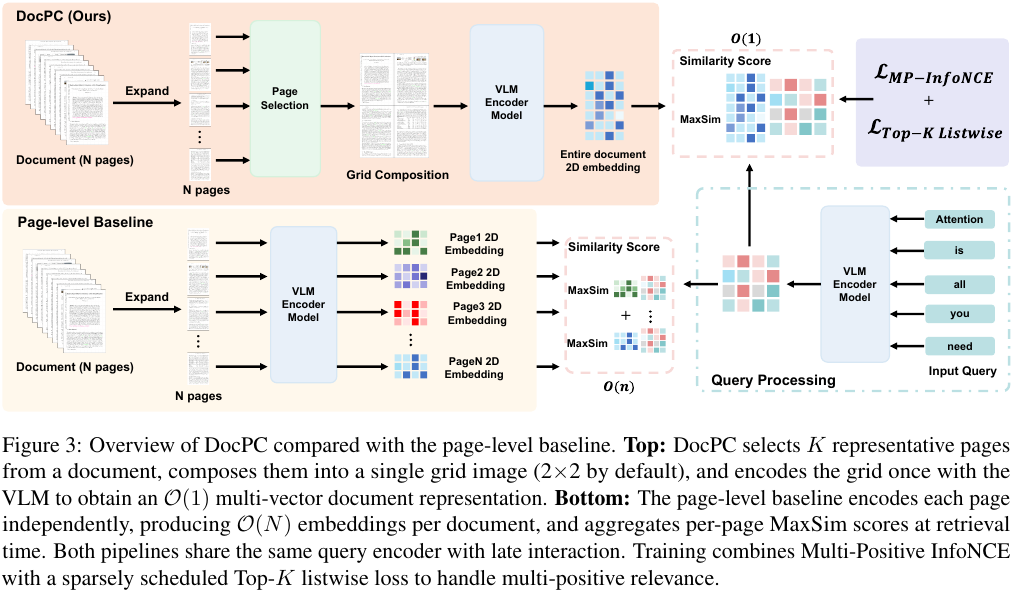
Source: DocPC paper by You, Zhou, and Du, Figure 3.
The diagram compares 2 paths. The top path selects K pages, creates a grid, and builds 1 document representation. The lower path creates N page representations and aggregates their scores. This makes the research question clear: can a system preserve useful cross-page signals while avoiding a representation that grows with every page?
The authors found that early pages carried stronger average document-level signals in a sampled analysis. Their default used the first 4 pages in a 2-by-2 grid. Yet the limitations section says the same compression can make small text and dense tables less legible, and the benchmark does not test downstream retrieval-augmented generation.
That tension is the useful editorial lesson. A strong opening can identify the document, its audience, and its main decision. It cannot replace the detailed page that carries the proof. Build a clear route between the two rather than crushing every fact into a cover or executive summary.
Which PDF failures should a content team look for?
Look for failures that separate the buyer's question from the page carrying the answer. Most can be found without pretending to know a model's hidden retrieval logic.
Use these 6 failure patterns:
| Failure | What to inspect | Smallest useful action |
|---|---|---|
| Vague identity | Title, subtitle, organization, date, version | Rewrite the cover metadata in buyer language |
| Weak navigation | Contents, headings, bookmarks, page labels | Add descriptive sections and reliable destinations |
| Detached evidence | Chart, caption, source, denominator, caveat | Keep the complete claim context beside the figure |
| Illegible detail | Small text, dense table, multi-panel chart | Publish a readable crop or HTML table with attribution |
| Cross-page dependency | Claim on one page, condition on another | Repeat the minimum condition or link the pages clearly |
| No next action | Final recommendation and owned destination | Add an HTML summary, practical asset, and relevant CTA |
Do not confuse document polish with evidence quality. A beautiful report can carry unsupported claims. A plain technical PDF can carry decisive evidence. The audit should preserve both visual usability and the authority, denominator, date, and limitations behind the claim.
The same rule applies to screenshots. A crop should include enough caption and surrounding context to avoid changing the meaning. If a table is too wide for mobile, keep a scrollable table or provide a legible image rather than shrinking 12 columns until nobody can read them.
How should you run the visual retrieval audit?
Run the audit from the buyer's question to the document and then to the exact evidence page. Do not start by redesigning the cover.
Use this 8-check worksheet:
Question: Write the exact buyer question the document should help answer.
Identity: Confirm the first page states the topic, audience, owner, date, and version.
Navigation: Test whether headings, bookmarks, and contents use recognizable language.
Evidence: Name the page containing the decisive chart, table, definition, or comparison.
Context: Confirm the source, denominator, period, conditions, and caveats appear nearby.
Legibility: Review the decisive page at desktop width and 390px mobile width.
HTML bridge: Decide whether an owned page should summarize the decision and link the full PDF.
Observation: Preserve what selected search or answer systems return before and after the change.
Then choose one route:
| If this describes you | Check this | Take this action |
|---|---|---|
| The PDF never appears anywhere | Indexability, links, text layer, canonical ownership | Fix technical access before editorial redesign |
| The document appears for broad queries only | Cover, contents, headings, and executive summary | Clarify document identity and buyer language |
| The right report appears but the wrong page is used | Page labels, captions, and cross-page conditions | Strengthen the evidence page and its navigation |
| A chart is cited without its caveat | Caption, methodology, denominator, and date | Keep the bounded claim and context together |
| The PDF informs interest but cannot convert it | Owned summary page and practical next step | Build the HTML bridge instead of duplicating the report |
| Results vary by engine or prompt | Defined prompt panel, date, region, and repeated runs | Preserve observations and avoid universal claims |
I inspected the complete paper pages before selecting the 2 figures above. The benchmark table keeps all 7 domains and both split totals. The method diagram keeps its caption and both retrieval paths. Neither image is being used as decoration or as the hero.
What can this audit prove, and what still needs judgment?
The audit can prove that a file has a text layer, clear page roles, legible evidence, visible attribution, and an owned path to action. It cannot prove that a particular model will retrieve, cite, or recommend the document.
Keep 4 evidence classes separate:
| Evidence class | What you can observe | What you cannot conclude alone |
|---|---|---|
| Technical | File access, status, text extraction, metadata, links | Query relevance or AI citation |
| Document | Page labels, chart context, captions, legibility | Hidden ranking or recommendation logic |
| Answer observation | Model, prompt, date, answer, citation, selected page | Total buyer demand or stable universal behavior |
| Business analytics | Visit, CTA, activation, qualification, revenue event | Causality without a declared design |
The DocPC paper supplies one bounded mechanism and benchmark. It does not supply a marketing outcome. Its authors explicitly limit coverage to 7 English domains, query-agnostic page selection, and no downstream retrieval-augmented-generation evaluation.
Human judgment still decides whether the document deserves to exist, whether a figure is fair, whether the source is authoritative, and whether the right action is a PDF edit, an HTML summary, a product correction, outside validation, or no new content.
How can Trovance reveal where a PDF fits the answer path?
Trovance can start with the public answer rather than an assumption that your PDF is the problem. For a defined company and question set, it observes how selected AI systems answer, cite, compare, and recommend. The team can preserve the answer and sources, inspect whether a PDF appears, and diagnose whether the missing work is document identity, inaccessible proof, unclear positioning, stale evidence, or legitimate bad fit.
That observation can lead to a governed content action: improve a source page, make a decisive figure legible, create an owned HTML bridge, preserve a methodology condition, or decline to publish another asset. Trovance helps move a justified evidence gap toward production and publication; it does not expose hidden model reasoning, guarantee that a PDF will be retrieved, control recommendations, or replace analytics and human review.
Start your free trial to see which answers and sources currently shape your company's story. Use that baseline to decide whether a PDF audit is warranted before redesigning the document.