
Technical SEO for AI search starts with a simple question: can the system reach, process, and use the page you want buyers to find? Fix those eligibility failures before rewriting content, adding special AI files, or trying to reverse-engineer citations.
A clean technical setup does not guarantee that Google will index your page or that any AI system will cite, compare, or recommend your company. It removes preventable failure points so the evidence on the page can compete on its merits.
Which situation describes your site?
Most teams do not need a bigger technical SEO checklist. They need to identify which of 4 situations they are actually in.
| Situation | What you can observe | What to do next |
|---|---|---|
| The page cannot be reached | The intended crawler is blocked, the route requires a login, or the server returns an error | Fix access or confirm that exclusion is intentional |
| The page can be reached but should not be indexed | A noindex rule, canonical, or other control points elsewhere |
Decide which URL should own the buyer job, then align the controls |
| The page is eligible but not appearing | Access, status, and indexable content pass, but indexing or visibility is absent | Inspect duplication, discovery, evidence quality, demand, and platform-specific behavior |
| The page appears but the answer is weak | The company is missing, described incorrectly, or loses a comparison | Stop treating technical eligibility as the only constraint; inspect claims, proof, sources, and fit |
The distinction matters because each situation leads to different work. Rewriting a technically blocked page does not solve access. Adding schema does not repair an error response. Publishing another page can make duplication worse when the original URL already owns the question.
What are the minimum technical requirements?
For Google's generative AI features, the baseline is ordinary Search eligibility. Google's current guidance says a page must be indexed and eligible to appear in Search with a snippet before it can be eligible for generative AI features.
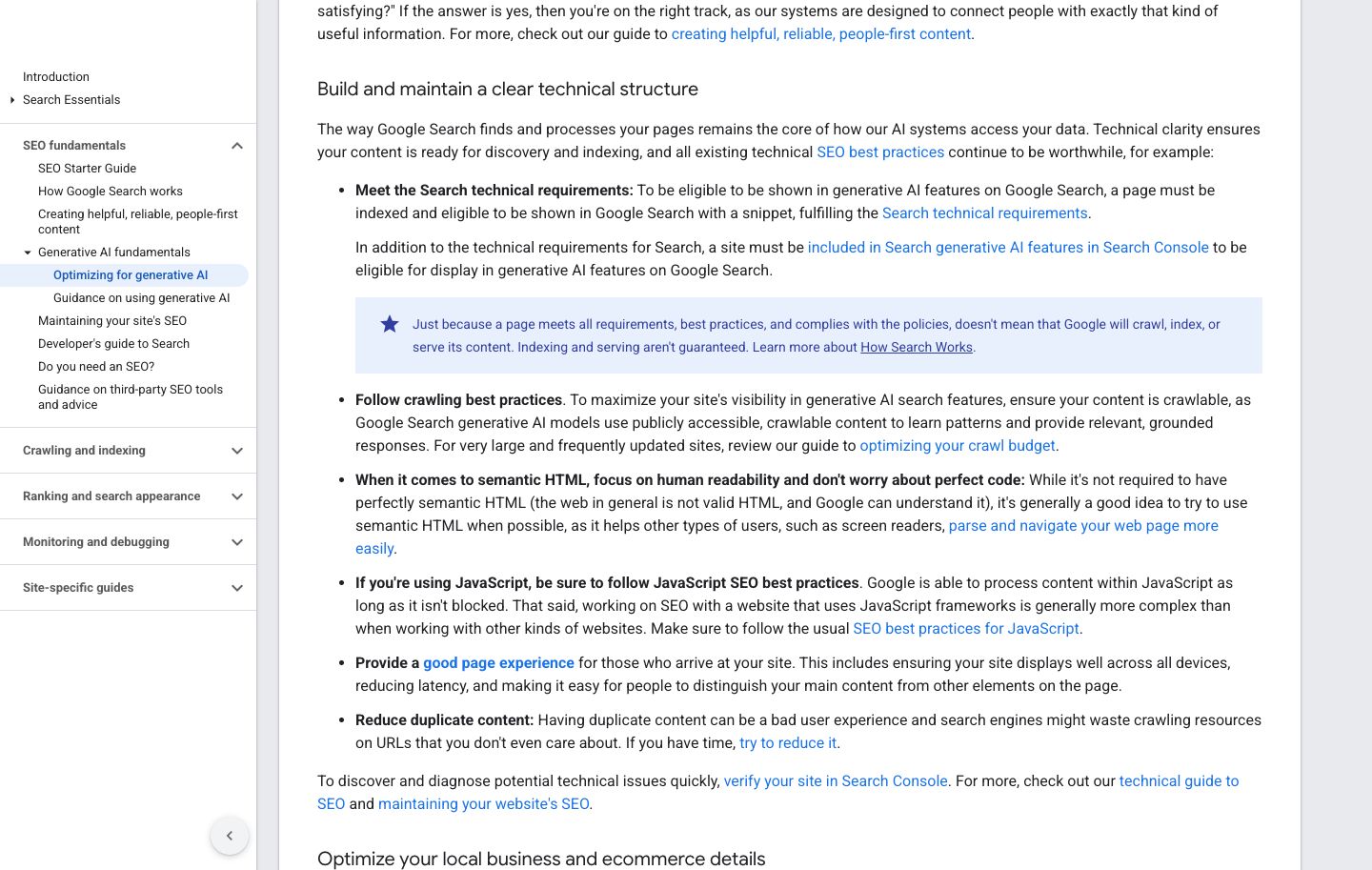
Source: Google Search Central, Optimizing your website for generative AI features. Screenshot captured September 4, 2026.
That guidance preserves an important boundary: eligibility is necessary, not sufficient. Google says crawling, indexing, and serving are not guaranteed even when a page meets the requirements, best practices, and policies.
Google's minimum technical requirements reduce to 3 checks:
- Googlebot is not blocked. The crawler can find and access the public page.
- The page returns HTTP 200. The canonical URL works rather than returning a client or server error.
- The page has indexable content. The response contains supported, policy-compliant content that Google can process.
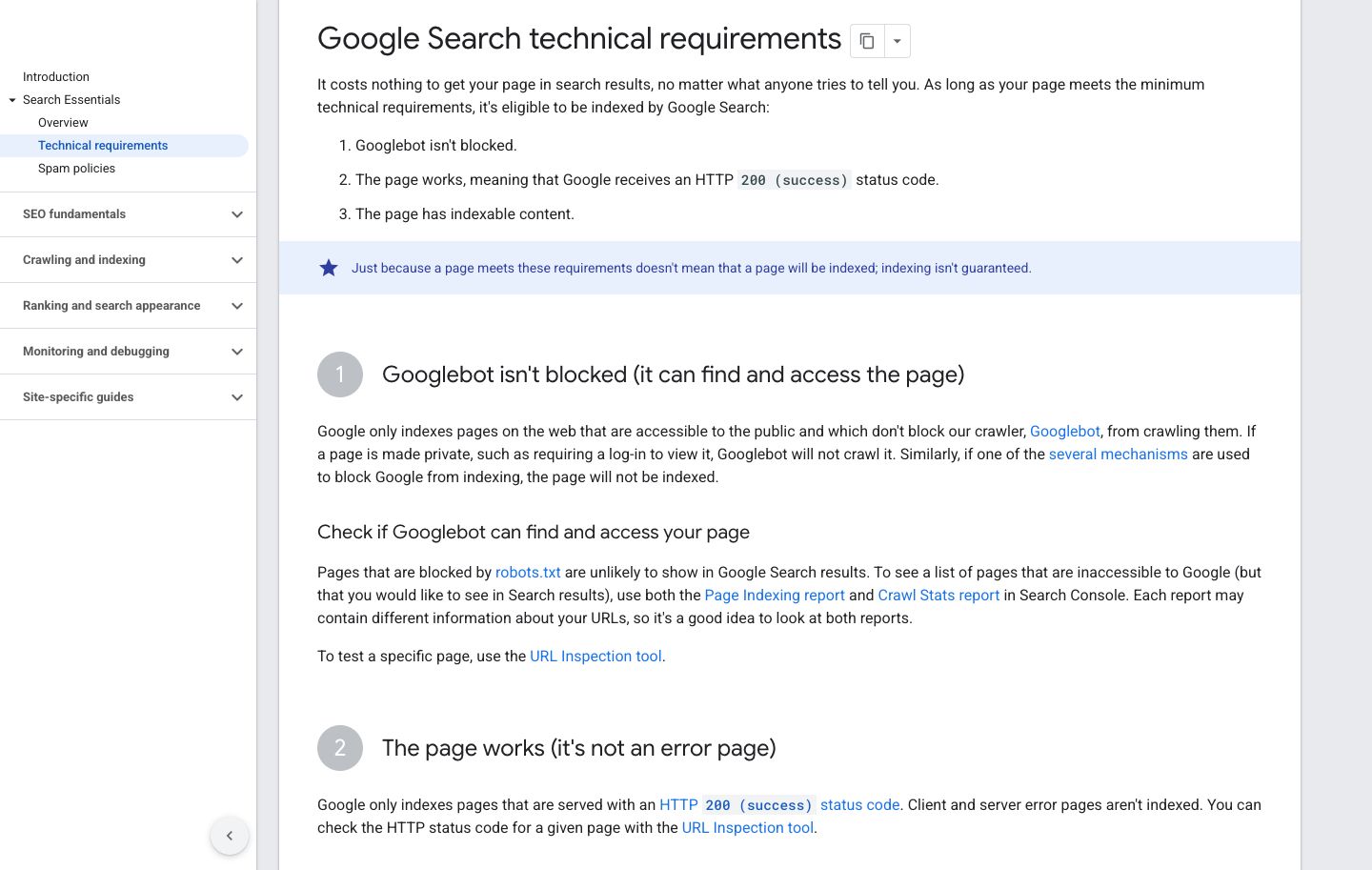
Source: Google Search Central, Technical requirements. Screenshot captured September 4, 2026.
Those are Google-specific requirements, not a universal contract for every AI product. Different systems have different crawlers, retrieval methods, indexes, partnerships, and policies. Audit each platform you care about separately rather than assuming one successful fetch proves universal availability.
How do you run a 7-check AI-search eligibility audit?
Use the canonical URL for one important buyer-intent page. Do not begin with the homepage by default. Choose the page that should answer a specific question, support a comparison, or prove a material claim.
1. Confirm public and crawler access
Open the page without a login, preview cookie, or employee network. Then review robots.txt and any edge, firewall, or bot-management rules for the crawler you intend to support.
Record the observed result. Do not infer access from a browser visit alone: your browser and a crawler may receive different responses.
2. Check the final HTTP response
Request the canonical URL and follow redirects. The final page should return HTTP 200 if you want it treated as a working page.
A redirect is not automatically a defect. It becomes a problem when it loops, lands on the wrong page, strips meaningful parameters unexpectedly, or sends crawlers and people to different destinations.
3. Inspect the main content in the response
Confirm that the title, H1, core explanation, decisive proof, and important links are available to the system that fetches the page. If JavaScript supplies essential content, test the rendered result rather than assuming every crawler executes the same path.
Google says it can process JavaScript content when it is not blocked, while also warning that JavaScript SEO is more complex. That is a reason to verify the output, not a reason to claim that all AI crawlers ignore JavaScript or that every site must become static.
4. Review indexing and snippet controls
Inspect the page's robots meta tag and HTTP headers, including X-Robots-Tag. An accidental noindex can remove an otherwise useful page from eligibility.
Access and indexing controls are different. Google's robots meta documentation notes that crawlers must be allowed to access a page before they can read its page-level rules. Keep the intended state explicit: public and indexable, public but excluded, or private.
5. Choose one canonical page for the buyer job
Check canonical tags, redirects, duplicate routes, parameter versions, and near-duplicate articles. The goal is not merely a technically valid canonical tag. The goal is one intentional page that owns the complete decision.
If 3 articles answer adjacent versions of the same question, consolidate before publishing a fourth. A clear canonical resource gives your team one place to maintain the claim, evidence, examples, and next action.
6. Verify discovery paths
Make sure the page is linked from a relevant hub, related resource, navigation path, or another page that gives the link useful context. Include it in the sitemap when appropriate.
Discovery is not proof of selection. A crawlable internal link and sitemap entry help systems find a URL, but they do not guarantee indexing, citation, or recommendation.
7. Test rendering and page experience
Exercise desktop and mobile layouts. Check whether the main content remains readable, evidence images load, tables scroll without widening the page, and intrusive elements do not obscure the answer.
Google includes page experience and duplicate-content reduction in its current generative-AI guidance. Treat those as user and processing hygiene. Do not convert them into a claim that one layout change caused a ranking or citation gain.
Should you add an llms.txt file?
Add llms.txt only when you have a defined consumer and maintenance plan for it. Do not treat the file as a shortcut around broken pages, weak evidence, or missing internal links.
Google's current documentation says it does not use llms.txt or other special AI text files for Google Search, including its generative AI capabilities. Google says creating one neither helps nor hurts visibility or rankings in Google Search, while acknowledging that other services may use such files.
That makes the decision straightforward:
- If a known agent or documentation workflow uses
llms.txt, maintain it as a curated map. - If no defined system consumes it, prioritize the canonical pages and ordinary technical controls first.
- If you publish it, keep its claims and links synchronized with the site.
- Never report the file's existence as proof that an AI system read, trusted, cited, or recommended the content.
What should the audit produce?
A useful audit ends with a repair queue, not a score. Give each check 1 of 4 states:
- Pass: observed under recorded conditions.
- Fail: a reproducible defect blocks the intended state.
- Not verified: the evidence is incomplete or the system could not be tested.
- Intentional exclusion: the page is correctly private, blocked, or non-indexable by policy.
For every failure, record the URL, expected state, observed state, test method, owner, and retest condition. Prioritize failures on pages closest to an active buyer decision. A broken comparison page usually matters more than an orphaned archive page with no demand or product role.
Then separate the work into 3 layers:
- Eligibility repair: access, response, indexability, canonicalization, discovery, or rendering.
- Evidence repair: missing, stale, conflicting, or weakly supported claims.
- Outcome measurement: visibility observations, site actions, activation, qualification, and revenue tracked with separate definitions.
A technical pass closes the first layer. It does not prove the second or third.
How does Trovance turn a technical finding into the next accountable action?
Trovance turns an observable AI answer, source, comparison, or recommendation gap into a prioritized workflow your team can act on. It connects the gap to the page and evidence worth inspecting, preserves the diagnosis, and routes the next move instead of leaving you with another visibility score or disconnected checklist.
When a target page is blocked or non-indexable, Trovance makes the technical repair the clear priority. When the page is eligible but the answer is wrong, it helps your team move into source and claim repair. When the answer is accurate but buyers still do not act, the workflow points attention toward the offer, CTA, product experience, audience, analytics, or sales handoff.
That means your team can move from observation to evidence to production with a shared record of what it found, what it changed, and what should be verified next. You spend less time debating a score and more time improving the pages and proof that shape how buyers discover and choose your company.
Start a free Trovance trial to capture your current answer and source baseline, find the most important gap, and turn it into your next growth action.