
AI visibility is not one number. Google Search Console can now show impressions and linked pages inside Google Search's generative-AI features. Google Analytics can classify identifiable visits from AI assistants. Product analytics and CRM systems carry the actions, qualification, and revenue that happen later.
Keep those records separate. An impression is not a visit. A visit is not a qualified account.
These reports are parallel observations, not a joined funnel. Google's AI Overviews and AI Mode are excluded from GA4's AI Assistant channel; Google includes them in Organic Search. Rising Google AI impressions alongside a flat AI Assistant row therefore does not establish a conversion problem.
First establish which population each report describes. Diagnose a handoff only where a defensible matched cohort or tracked path connects the records.
What changed in Google Search Console's AI reporting?
Google Search Console now has a dedicated performance view for impressions inside Google's generative-AI features. Google says the Search report includes AI Overviews and AI Mode, and groups the data by linked page, country, date, and device. Use it to inspect exposure; use a different system to measure identifiable visits and business outcomes.
That is a material change from the earlier measurement contract. A 2025 Search Central Community question asked whether teams could identify AI Mode or AI Overview hits and exposure. At that time, the recommended answer said those features could not be separated from the general Web report. Google's June 2026 launch introduced a dedicated view, and its launch note says the insights had rolled out worldwide by August 31, 2026.
Evidence at readable size. Swipe or scroll horizontally to read all columns; keyboard users can focus the image and use arrow keys.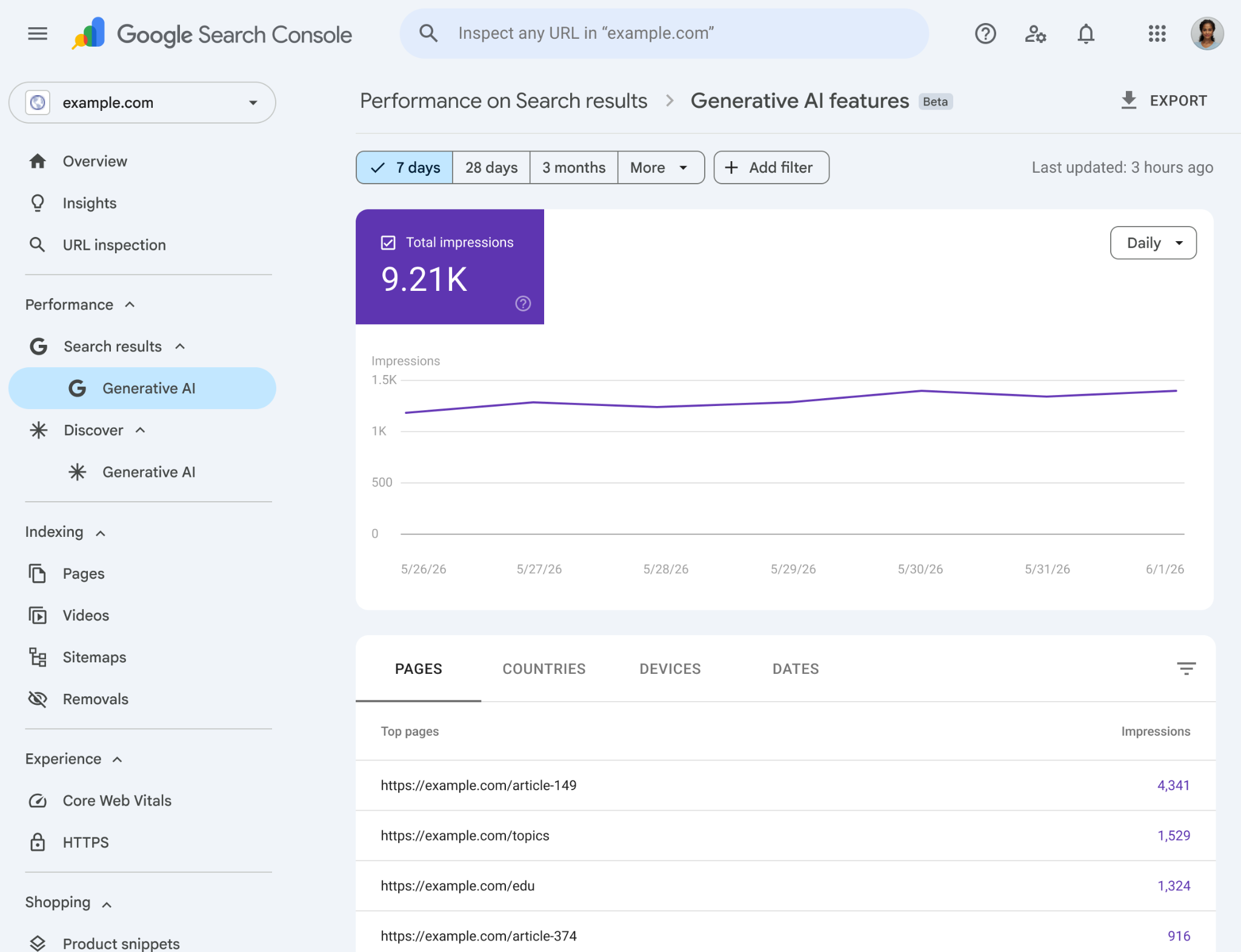 Source: Google Search Central. Product screenshot; example data, accessed October 2, 2026. Open the full-resolution figure.
The visible interface shows the correct upstream unit: impressions. Google defines an impression here as a link to your site being shown in a generative-AI feature. The Pages tab identifies which final URLs appeared; the other dimensions describe country, date, and device. None of those fields says which hidden prompt produced the appearance, whether the user clicked, or whether the user was a qualified buyer.
Google's launch note says the report rolled out worldwide. Its current Help page says a missing report usually means the site has not received enough impressions in Google Search's generative-AI features; excluding the site from those features can affect eligibility. Check the actual property and its eligibility before promising the report to a stakeholder.
What changed in GA4's AI traffic classification?
GA4's current default-channel documentation includes an AI Assistant rule for identifiable arrivals. The rule matches the ai-assistant medium, or sets that medium and the (ai-assistant) campaign when the referrer matches Google's maintained assistant list. Use the resulting row as a traffic-source classification, not as a census of every AI-influenced journey.
Google explicitly excludes AI Overviews and AI Mode from the AI Assistant channel and includes them in Organic Search. That is narrower than traffic influenced by AI. The row only describes visits GA4 can classify from the available traffic-source data. It does not observe every answer that mentioned you, every citation that informed a buyer, or every assistant session that ended without a click.
Evidence at readable size. Swipe or scroll horizontally to read all columns; keyboard users can focus the image and use arrow keys.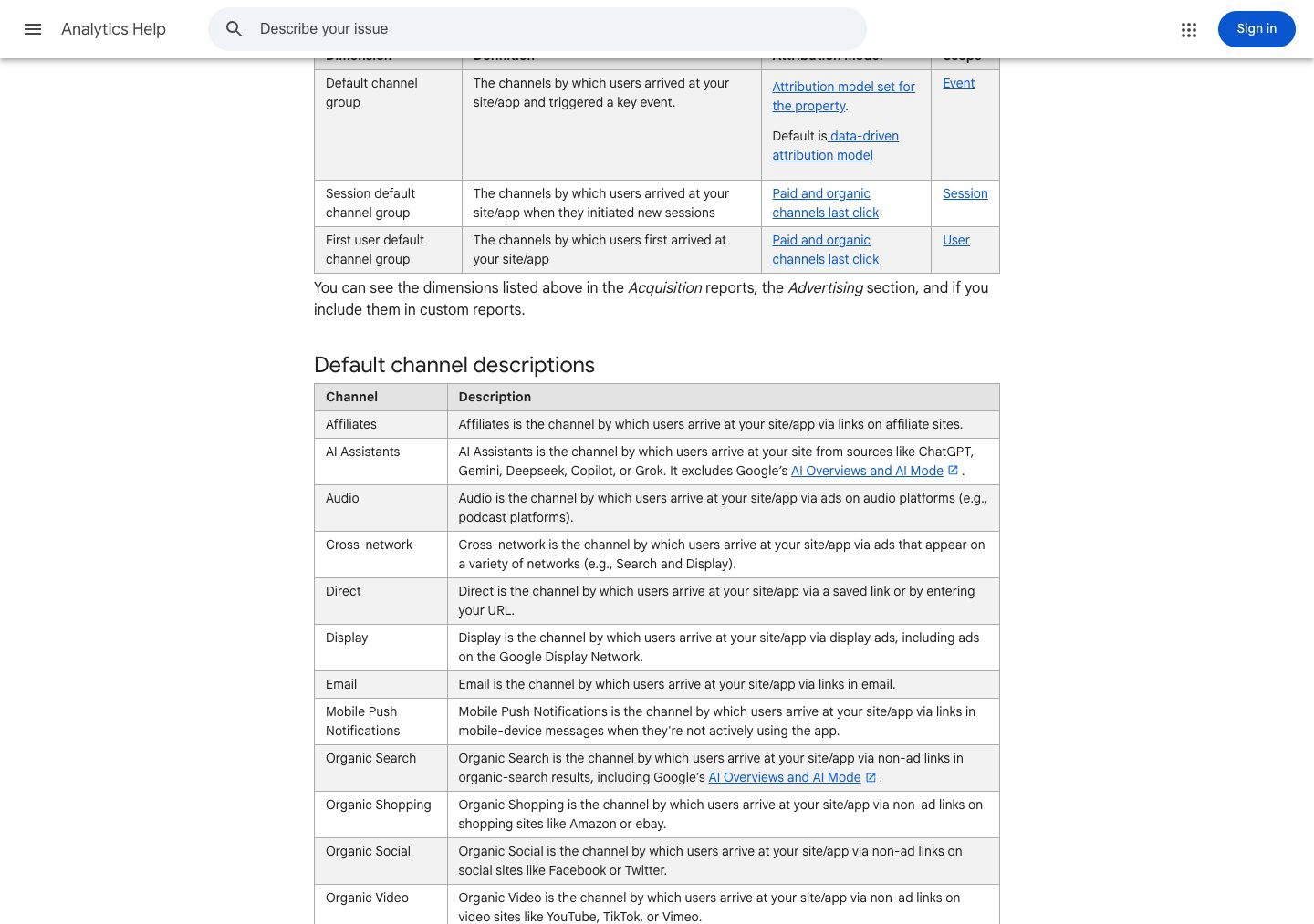 Source: Google Analytics Help. Screenshot captured August 10, 2026; the current Help page uses the singular label "AI Assistant." Open the full-resolution figure.
In our editorial source review on October 2, 2026, we reopened the current definition. The singular label differs from the saved August screenshot, so this article uses the current wording in prose and preserves the screenshot's date rather than pretending the interface never changed.
Google also says channel definitions may evolve. Save the date range, property, dimension, and definition you used when reporting a trend. A quarter-over-quarter chart becomes hard to defend if the underlying classification changed and nobody recorded it.
October 8–16: did ChatGPT traffic change, or did attribution?
Investigate attribution before changing the content plan. Profound's October 14 investigation, updated through October 16, reports source-link tagging declined from October 8 at 18:30 UTC. By October 16 at 06:30 UTC, approximately 99% of its collected answers with cited links again included a tagged source link, persisting through 16:30 UTC.
That denominator is answers, not visitors. This is a vendor observation, not OpenAI confirmation or measured Trovance traffic. Do not use its percentages to correct traffic or revenue. Restored tags do not reconstruct earlier attribution; missing tags do not necessarily mean Direct if a referrer survives.
Use this editorial checklist:
- Convert the UTC boundaries to the property's timezone; preserve before, during and after windows.
- Inspect session source/medium, available referrers and landing-page parameters. Do not assign unexplained Direct visits to ChatGPT.
- Compare overall sessions and qualified outcomes separately; keep Google AI-search exposure outside the assistant-referral denominator.
- Annotate the interruption and recovery. A referral drop or rebound alone does not establish changed demand.
Which GA4 dimension should you use first?
Use Session default channel group for the first report because it describes the channel that initiated each session, including sessions from returning users. Pair it with Session source / medium to inspect the underlying classification, and keep event-credit and first-user dimensions out of the first comparison unless those are the questions you intend to answer.
GA4 exposes 3 related scopes, and they answer different questions:
| GA4 dimension | What it answers | Attribution treatment |
|---|---|---|
| Default channel group | Which channel receives credit for a key event? | Property attribution model; Google says the default is data-driven |
| Session default channel group | Which channel initiated this session? | Paid and organic channels last click |
| First user default channel group | Which channel first acquired this user? | Paid and organic channels last click |
Do not place those three columns beside each other and treat disagreement as an error. Event credit, current-session origin, and first-user acquisition are different measurement jobs.
The Traffic acquisition report is the right starting point because Google says it covers new and returning users. The User acquisition report answers a different question about new users. For an early AI traffic read, the session scope gives you the cleanest view of identifiable visits arriving now.
What should an AI traffic scorecard include?
An AI traffic scorecard should keep volume, on-site behavior, declared conversion events, and business qualification in separate columns. Show the raw count behind every rate, name the system that owns each event, and stop the claim where the records stop. That makes a small channel interpretable without inflating a referral into demand or revenue proof.
Start with this table for each assistant source and the combined AI Assistant channel:
| Measure | Denominator | What you can say | What you cannot say |
|---|---|---|---|
| Sessions | Classified sessions in the period | Identifiable visits arrived in the selected channel | How many assistant answers exposed the brand |
| Engaged sessions | Classified sessions | Visits met GA4's engagement rule | The visitor was a qualified buyer |
| Session key event rate | Classified sessions | A declared key event occurred in a share of sessions | The assistant caused the event |
| Qualified starts or accounts | Your product or CRM cohort | A business-defined downstream action occurred | The session was incremental |
| Revenue | Correctly instrumented revenue events or CRM records | Revenue was assigned under the declared method | Revenue would not have happened otherwise |
For the engagement row, Google's Traffic acquisition definition counts sessions lasting 10 seconds or longer, or with at least one key event, or at least two page or screen views. That threshold describes recorded behavior, not buyer fit; keep the qualification rule separate.
Which system should answer each AI measurement question?
Use the system whose record actually contains the event. Search Console owns Google AI-search impressions, GA4 owns classified site sessions, product analytics records defined product actions, and CRM or billing owns qualification and revenue. This sounds obvious until one dashboard's convenient label starts standing in for the entire buyer journey.
| Question | System of record | Useful unit | Decision it supports |
|---|---|---|---|
| Did our pages appear in Google Search's AI features? | Search Console generative-AI report | Impressions and linked pages | Inspect exposure by page, country, device, and time |
| Did an identifiable assistant referral reach the site? | GA4 traffic acquisition | Sessions under the current source rule | Inspect landing paths and on-site behavior |
| Did the visitor begin the intended action? | Product analytics | Account, scan, trial, or other defined start | Diagnose page-to-action continuity |
| Did the account fit and progress? | CRM or governed qualification record | Qualified account or accepted opportunity | Diagnose audience and offer fit |
| Did revenue occur? | CRM and billing | Paid, retained, or expanded value | Report business outcome under a declared attribution rule |
The artifact here is not another blended score. It is a record of separate observations and any defensible connections between them. If Google AI impressions are absent, inspect property access, eligibility, demand fit, and evidence before interpreting that absence.
Do not divide GA4 AI Assistant sessions by Google AI-search impressions or call a difference between those rows a failed handoff. They cover different populations. Within a tracked, comparable referral cohort, visits without qualified starts can justify inspecting conversion, offer, product fit, or instrumentation—not automatically commissioning another article. Here, a qualified start means a start that meets your explicitly documented fit and action criteria; the event alone does not establish qualification.
How should you compare AI assistant traffic with other channels?
Compare like with like: use the same session scope, date window, event definitions, qualification rule, and revenue source. Put raw counts beside rates and record channel-definition changes. Otherwise a different attribution scope, a tiny denominator, or a reclassified source can look like performance even when the underlying buyer behavior did not change.
A small channel can look impressive because one transaction moves the rate sharply. Report the numerator beside the percentage. For example, two qualified starts from 20 sessions carries more information than 10% conversion, especially before the sample is stable.
We recommend this 4-part comparison record. It is our reporting checklist, not a Google-prescribed framework; Google's Traffic acquisition documentation supplies the session and metric definitions:
- Declare the property, period, timezone, and session-scoped dimension.
- Show sessions and the raw count behind every rate.
- Separate GA4 key events from product-qualified or sales-qualified outcomes.
- State the attribution model and any missing referrer, identity, or cross-device limitations.
Traffic-source fields help audit where a classified row came from. They do not reveal the assistant's prior answer, prompt, cited evidence, or hidden reasoning.
The same discipline applies to revenue. Instrumentation failure can look like channel failure, and an attribution model can assign credit without estimating what would have happened in the absence of the exposure.
What can GA4 prove about AI-assisted revenue?
GA4 can show that a classified session occurred and that measured actions or revenue received credit under a declared scope and attribution model. It cannot prove, by itself, that an AI assistant caused the buyer to visit, qualify, or purchase. Keep observed, attributed, inferred, and causal statements separate so reporting stays useful without becoming a story the data cannot support.
Keep these 4 evidence states separate:
| Evidence state | Defensible statement | Missing proof |
|---|---|---|
| Observed | GA4 classified a session as AI Assistant | The full assistant interaction before the click |
| Attributed | A key event or revenue received channel credit | Causal incrementality |
| Inferred | The visit may reflect AI-assisted research | Competing paths, missing referrers, and cross-device behavior |
| Business validated | The account qualified, retained, or produced revenue | A counterfactual showing what would have happened without the exposure |
That boundary cuts both ways. An AI Assistant row can overstate a clean causal story, while referral analytics can understate AI's role when an answer sends no click, strips the referrer, or prompts a later branded search. Missing traffic is not proof of missing influence.
A visit is not a qualified account, and an attributed sale is not automatically an incremental sale. Public answer counts, citations, screenshots, views, and engagement are useful observations. They are not acquisition or revenue proof without a defined cohort, denominator, attribution rule, and observation window.
How can Trovance turn the measurement gap into the next action?
Trovance connects the upstream answer state to the evidence action, giving the team a concrete decision before it opens another content ticket. Start with the buyer questions that matter. Inspect how AI systems explain, cite, compare, and recommend the company. Then diagnose whether the weak result comes from missing proof, stale facts, unclear positioning, thin comparison language, technical access, external reputation, or legitimate bad fit.
That diagnosis makes the reporting layers useful together. Search Console can show whether linked pages appeared in Google's AI features. GA4 can show identifiable assistant-referred visits.
Product analytics and CRM can show defined actions and business outcomes after arrival where the records can be connected. Trovance supplies the missing operational layer between observation and production: what evidence should exist, which current asset should change, and when the right decision is not to publish.
Bring the measurement question to Trovance: which answers describe the business, which sources support them, and which evidence deserves a closer look? Keep the claims, sources, and human review attached to the next action. Explore Text Trovance for the available next step. The entry page offers the available messaging or web route; you choose whether to send a message.